

DH2026 FAQ
Location: Daejeon Convention Center (DCC), Daejeon, Republic of Korea | July 27–31, 2026
Official English Homepage ·
Google Maps (Plus Code: 99GR+3P Daejeon)
Note: The Daejeon Convention Center comprises two separate buildings, DCC I (the older building) and DCC II (the newer building). All DH2026 activities take place in DCC I. Please disregard signage or directions pointing to DCC II.
Note: Google Maps and Apple Maps do not provide reliable walking or driving directions in South Korea. We recommend downloading Naver Map (best for public transit and walking) and KakaoMap (best for taxis, via the Kakao T integration) before you arrive. Both offer English interfaces.
Naver Map: Web (Korean only) · Play Store (Android) · App Store (iOS)
KakaoMap: Web (Korean only) · Play Store (Android) · App Store (iOS)
On this page
1. Conference Venue Arrival and Check-in
Q. Is WiFi available at the venue?
A. Yes. Free WiFi is available throughout the venue. Connect to the SSID “DCC Free wifi” (no login required).
Q. Where do I pick up my name badge?
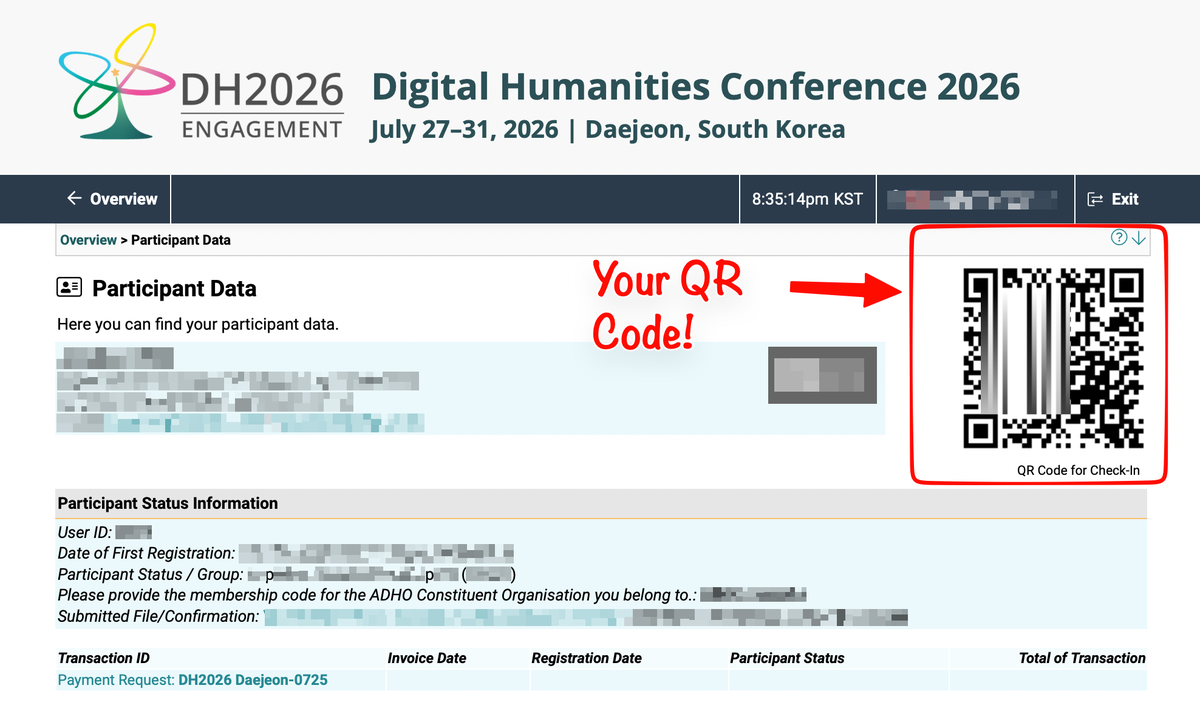
A. The DH2026 registration desk is located on the first floor (1F) of DCC I, in the central concourse between the session rooms (101–108) and the poster area (rooms 109–110). Please state your name and affiliation, or have your ConfTool confirmation QR code or ConfTool ID number ready.
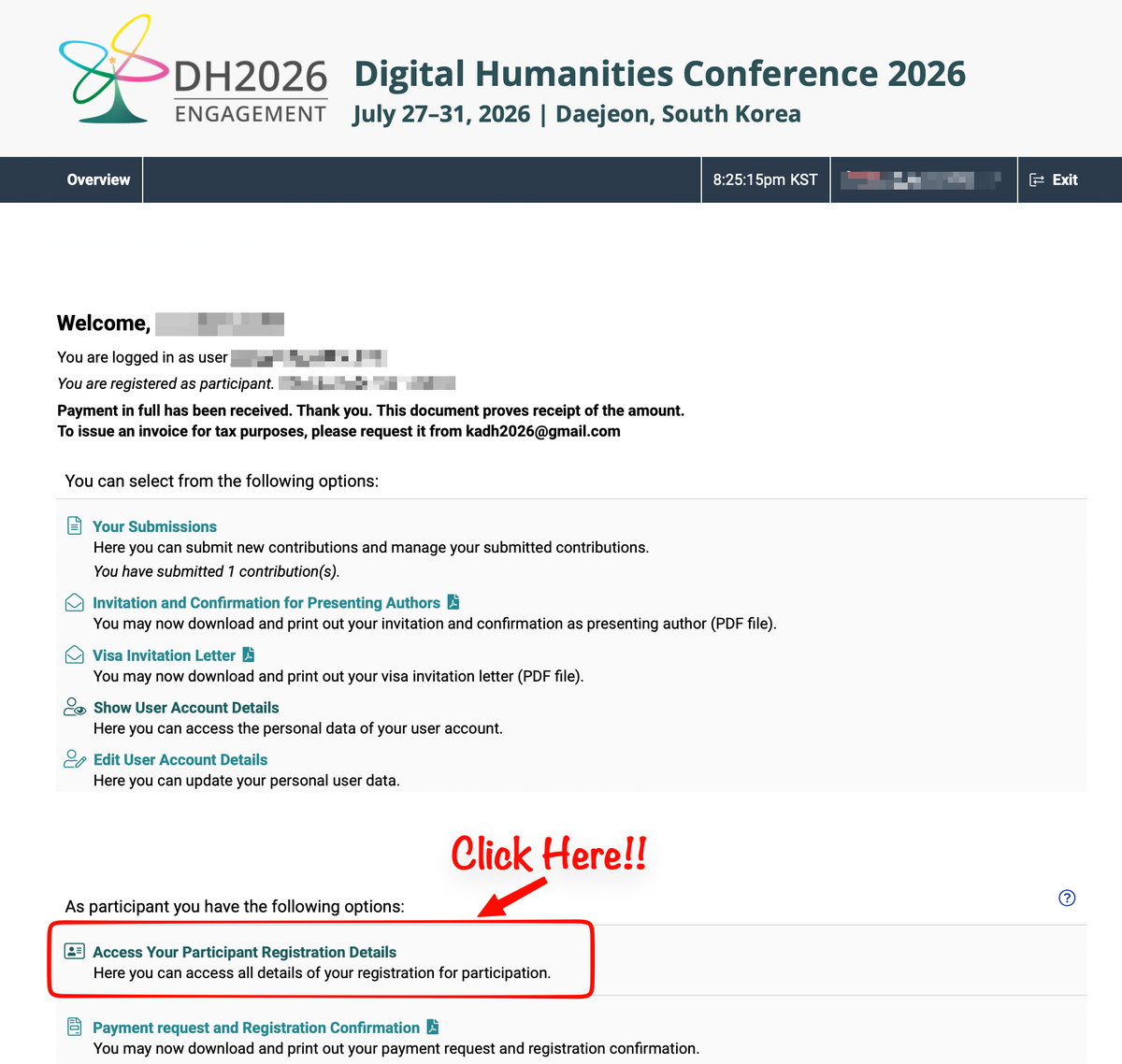
How to access your ConfTool QR code: log in to ConfTool and click “Access Your Participant Registration Details” (see images below).
Q. When can I pick up my badge?
A. The registration desk will be open from Monday, July 27, 8:30 to 18:00, and daily thereafter from 8:30 to 18:00.
Q. Do I need to wear my badge?
A. Yes. Badges must be worn visibly at all times within the conference venue and are required for entry to all sessions, coffee breaks, and social events. Venue staff may ask unbadged individuals to return to the registration desk.
Q. What if I lose my badge?
A. Please report to the registration desk. A replacement can be issued after identity verification. Replacement fee: $10.
Q. Can someone else pick up my badge for me?
A. No. Badges are issued only to the registered attendee in person.
2. Venue and Transportation
Q. How do I get from Incheon International Airport (ICN) to Daejeon?
A. Daejeon is about 220 km south of Incheon Airport. Two good options:
- Direct airport limousine bus (no transfers; easiest with luggage): Board at the airport and ride directly to Daejeon (approximately 2.5–3 hours depending on traffic). Fares vary from ₩27,700 to ₩35,900. Buy your ticket before boarding at a counter or self-service kiosk (international credit cards accepted; English available). Boarding is at Terminal 1, 1st floor near gate 11A, or Terminal 2, Transportation Center (basement level 1). Get off the bus at Daejeoncheongsa station.
- KTX high-speed train (fastest overall, one transfer): Take the AREX Airport Railroad Express to Seoul Station (about 43 minutes from Terminal 1, 51 minutes from Terminal 2; ₩13,000), then transfer to a KTX train and get off at Daejeon Station (about 1 hour).
Further information is available at the official DCC Transportation Guide, the ICN Airport Public Transport Guide (Bus) (click “Bus Search”, search “Daejeon”, and select “Daejeon” from the results), and the ICN Public Transport Guide (Train).
3. Program and Schedule
Q. Where can I find the conference program?
A. The authoritative, up-to-date program is available in the Whova conference app and web portal, which is now live. All registered attendees should have received an invitation to join; if you have not, please check your spam folder, sign in using your ConfTool email address, or contact kadh2026@gmail.com. Whova has been the official app of the DH conference since DH2023. The program is also viewable in ConfTool; however, in case of discrepancy, Whova reflects the most current schedule.
Q. How will I be notified of room changes or cancellations?
A. All schedule changes during the conference will be announced via Whova push notifications and posted at the information desk. We will not send email announcements for individual session changes, so please enable notifications in the app.
Q. Can I build a personal schedule?
A. Yes. Whova allows you to bookmark sessions, build a personal agenda, message other attendees, and post questions to session Q&A boards. A brief guide to the app will be circulated before the conference.
Q. Is there a printed program?
A. No, there is no printed program. A one-page schedule overview is printed on the back of your badge and posted at points around the venue. In keeping with the conference's sustainability commitments, no paper programs will be distributed; the full, up-to-date program is available digitally in Whova.
4. For Presenters Onsite
Q. Can I present from my own laptop?
A. No. Personal laptops cannot be connected to the projection system in any session room. DH2026 is a hybrid conference, and all session rooms operate a dedicated, pre-configured setup that integrates projection, the stream for online participants, and the AI-assisted live translation service for sessions that have opted in. Connecting personal devices would interrupt the stream and the translation feed and delay the session. We appreciate your understanding: this policy exists to protect the experience of remote participants and of attendees relying on translation, not to inconvenience presenters.
Q. How do I get my slides onto the room computer?
A. Presentation files are loaded onsite. Please bring your file on a USB flash drive to the staff in your session room during the break preceding your session. Please do not wait until the session changeover itself, as loading time cannot then be guaranteed. The room staff will load your file onto the room computer, and your session chair will confirm at the start of the session that all presentations are ready.
Q. What file formats are supported?
A. Please prepare slides in PowerPoint (.pptx) or PDF. Room computers run Windows 11 with PowerPoint and a PDF reader. If your presentation includes embedded video or audio, please embed the media in the file or bring media files separately and test them with the room technician before your session. Presenter view is not available; please bring printed notes if you rely on speaker notes.
Q. When should I arrive at my session room?
A. Please arrive at least 10 minutes before the session begins and identify yourself to the session chair and the room staff, who will confirm that your file is loaded.
Q. Who will manage the session?
A. The session itself will be managed by the session chair. Before the conference, your chair may contact you via Whova or email regarding the presentation order, the structure and timing of the session, and the format and management of the Q&A. Please follow the chair's instructions to help ensure that the session runs smoothly.
5. For Virtual Presenters and Attendees
Q. How do I join my session online?
A. All virtual sessions are accessed through the Whova app or the Whova web portal. Simply open your session in Whova and click the Zoom link provided there.
Q. How do virtual presenters give their presentations?
A. Virtual presenters should join the Zoom meeting using the same Zoom link provided in Whova. Presentations and discussions take place entirely within the Zoom meeting. Please join at least 10 minutes before the session begins so that the session chair and room technician can confirm your audio and video are working properly.
Q. Who will manage the online session?
A. As with onsite sessions, the session chair will manage the order of presentations, moderate the discussion, and coordinate the Q&A. If necessary, the chair may contact presenters via Whova or email before the conference regarding the running order or other session arrangements.
6. Code of Conduct
Q. Is there a code of conduct?
A. Yes. All participants in DH2026, onsite and online, are required to abide by the ADHO Conference Code of Conduct, available at this link. Attendance at the conference constitutes agreement to the Code. Reporting procedures and onsite contacts are described on that page.